TLSNotary Plugins: What They Can Access and How You Stay in Control

If you've installed the TLSNotary browser extension, you've seen Chrome's permission warning: this extension can "read and change all your data on all websites." That sounds alarming. It is worth explaining exactly why those permissions exist, what prevents them from being misused, and what the per-call manual approval flow gives you on top of all that.
How Plugins and the Extension Work Together
Prove your bank balance to a lender without sharing your login. Prove your follower count to a third party without exposing your private DMs. These are the kinds of things a TLSNotary plugin can do.
A plugin handles the application-specific part of web proofs: which site to open, which request to capture, and which parts of the response to reveal. The extension does everything else. It is the host that runs plugins, the sandbox that keeps you safe while they run, and the machinery that turns an authenticated request into a web proof with minimal effort from the developer.
That split is what shapes the extension's permissions: to host any plugin and prove a request to any site, the extension needs broad browser access. The rest of this post is about what keeps that access in check.
But before we get to those safeguards, here is how a plugin and the extension actually work together.
A few things in that diagram are worth pulling out before we get into permissions:
- The Prover is a WebAssembly engine that runs the TLS connection together with a Verifier under two-party computation (step 7). The server sees a normal TLS connection; the Verifier witnesses the whole session without ever seeing the plaintext.
- Selective disclosure (step 8) happens at the byte level. The plugin's handlers decide which spans of the transcript the Verifier gets to read in plaintext (
REVEAL), which appear only as a hash commitment (HASH), and which are redacted entirely.
The broad Chrome permissions exist because steps 2–4 require attaching a webRequest listener to a window that can be pointed at any host — and reading the auth headers Chrome would normally hide. The rest of the post is about what stops that capability from being abused.
The Permissions, One by One
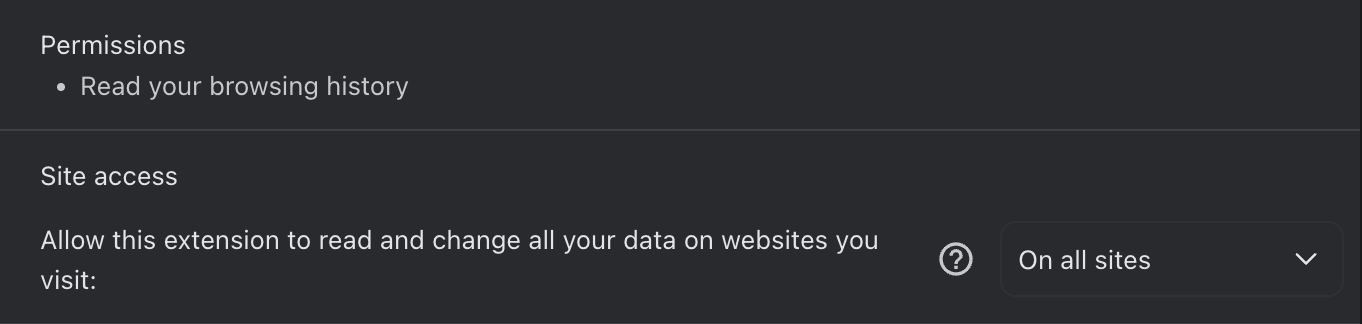
The extension's manifest declares five permissions and one host permission:
"permissions": [
  "offscreen",
  "webRequest",
  "activeTab",
  "tabs",
  "windows"
],
"host_permissions": ["<all_urls>"]
webRequest is the core one. It is the Chrome API that lets the extension observe outgoing requests before they leave the browser. Without it there is no way to capture the authenticated headers that make a proof meaningful.
<all_urls> as a host permission serves two purposes. First, it lets the webRequest listener fire on any HTTPS host — necessary because TLSNotary plugins can prove requests to any server, and it would be impossible to pre-list every host a future plugin might target. Second, the extension injects a content script into every page to expose window.tlsn to websites, and content script injection itself requires a host permission that covers all pages. Both needs point to the same <all_urls> declaration.
The alternative — letting users grant host permissions one at a time at runtime — is technically possible in Chrome, but it means the user would have to manually approve the extension for every new host before any plugin can interact with it. That interaction cost would make the extension essentially unusable.
The permission does not mean the extension reads requests from all your tabs; see below.
extraHeaders is not a manifest permission but a flag passed to the webRequest listener at runtime (you can see it in the code below). It unlocks access to Cookie, Authorization, X-CSRF-Token, and similar headers. Chrome hides these by default precisely because they are sensitive. TLSNotary needs them because they are the headers that authenticate a request as coming from the real user.
tabs and windows allow the extension to open and track the dedicated browser window in which request interception happens. When a plugin calls openWindow('https://x.com'), the extension creates a managed window, records its ID, and limits interception to that window's traffic.
offscreen is a Chrome 109+ requirement. The WASM-based TLS prover runs in a background offscreen document because service workers cannot execute WebAssembly. Without this permission the proof engine has nowhere to run.
activeTab rounds out the list, giving the extension tab access for overlay management.
The Critical Scoping Detail
The webRequest listener fires on <all_urls>, but the handler immediately checks whether the request came from a window the extension manages:
browser.webRequest.onBeforeRequest.addListener(
  (details) => {
    const managedWindow = windowManager.getWindowByTabId(details.tabId);
    if (managedWindow && details.tabId !== undefined) {
      // record the request
    }
  },
  { urls: ['<all_urls>'] },
  ['requestBody', 'extraHeaders'],
);
If windowManager.getWindowByTabId returns nothing — meaning the request came from a tab the user opened themselves — the handler exits immediately. The extension does not record or process any traffic from normal browsing.
Mobile: The Same Capability, Native APIs
Note: TLSNotary on mobile is currently under active development and has not yet been officially released. The model described below reflects the in-progress architecture.
The mobile SDK (tlsn-mobile) needs the same ability to capture authenticated traffic but operates in a native WebView rather than a browser extension context. The approach mirrors the extension:
- Android's
CookieManagerand iOS'sHTTPCookieStorageare queried directly to read HttpOnly cookies that JavaScript cannot reach. - JavaScript is injected into the WebView to intercept
fetch()andXMLHttpRequestcalls and record outgoing headers. - The WebView User-Agent is set to match a real mobile browser, because OAuth providers reject sign-in from embedded WebViews that identify themselves as such.
The net capability — seeing real authenticated HTTP traffic — is identical. The implementation just uses platform APIs instead of Chrome extension APIs.
Five Layers of Safeguards
Broad capability without constraints would be a serious problem. Here is what constrains it.
Layer 1: The QuickJS Sandbox
Plugins do not run as extension code. They run inside a WebAssembly sandbox (@sebastianwessel/quickjs) with allowFetch: false and allowFs: false. A plugin cannot make HTTP requests of its own, read files, or access anything outside the sandbox.
The only things available to plugin code are capabilities the Host class explicitly injects. Of those, three touch private data:
prove()— submits an authenticated HTTPS request through the TLS prover and sends the resulting transcript to a verifier. This is the most consequential capability in the system.useRequests()/useHeaders()— read intercepted request data from the managed window the plugin opened, so the plugin can act on auth tokens or request bodies the user has already submitted.
The rest of the injected API is UI (div, button, input), reactive state (useState, setState, useEffect), and utilities (getJsonBody, done, openWindow). None of them touch private data. A plugin cannot call fetch, import modules, read browser storage, or communicate with any system outside what those functions expose.
Layer 2: Plugin Permission Declarations
Every plugin ships a PluginConfig object as part of its source code:
export const config: PluginConfig = {
  name: 'Twitter Follower Count',
  description: 'Proves your follower count from the Twitter API',
  requests: [
    {
      method: 'GET',
      host: 'api.x.com',
      pathname: '/1.1/users/show.json',
      verifierUrl: 'https://verifier.tlsnotary.org',
    },
  ],
  urls: ['https://x.com/*'],
};
requests is the list of prove() calls the plugin is allowed to make. Each entry specifies the exact method, host, pathname pattern, and verifier URL. urls is the list of hosts the plugin can open a window to. This configuration is part of the plugin's source — reviewable before anyone installs it.
Layer 3: Runtime Permission Enforcement
A plugin declaring a permission in its config is not enough on its own. Before every prove() call, permissionValidator.ts checks the actual runtime request against the config:
// If no config or no requests permissions defined, deny by default
if (!config?.requests || config.requests.length === 0) {
  throw new Error(`Permission denied: Plugin has no request permissions defined.`);
}
The validator checks method (case-insensitive), host (exact string match), pathname (glob with * for a single segment and ** for multiple), verifier URL (exact), and proxy URL (exact or derived from the verifier URL). Every check must pass. If any one fails, the call throws — the plugin cannot prove anything outside its declared scope, even if it tries.
Layer 4: The Approval UI
Before a plugin runs at all, the user sees a confirmation screen showing the plugin's name, icon, description, and the complete list of every host and path it is permitted to access. There is also an inline source code viewer — the user can read the full plugin code before clicking Approve. The plugin cannot execute without explicit approval.
Layer 5: Selective Disclosure
Even after a prove() call is approved and the TLS session is complete, the plugin controls exactly what ends up in the proof through handlers:
handlers: [
  { type: 'SENT', part: 'START_LINE', action: 'REVEAL' },
  { type: 'RECV', part: 'BODY', action: 'REVEAL',
    params: { type: 'json', path: 'followers_count' } },
  { type: 'RECV', part: 'HEADERS', action: { kind: 'HASH', algorithm: 'BLAKE3' },
    params: { key: 'date' } },
]
REVEAL includes the plaintext range in the proof. HASH includes only a commitment (BLAKE3, SHA256, or KECCAK256) — the value is provably committed to but not readable by anyone who sees the proof. Individual header names can be hidden with hideKey; individual header values with hideValue. JSON field values can be extracted by path. Anything not covered by a handler is redacted from the proof entirely. The transcript bytes that were captured in the TLS session never appear in the output unless a handler explicitly marks them for disclosure.
Manual Approval: You Decide Before Each Proof Is Sent
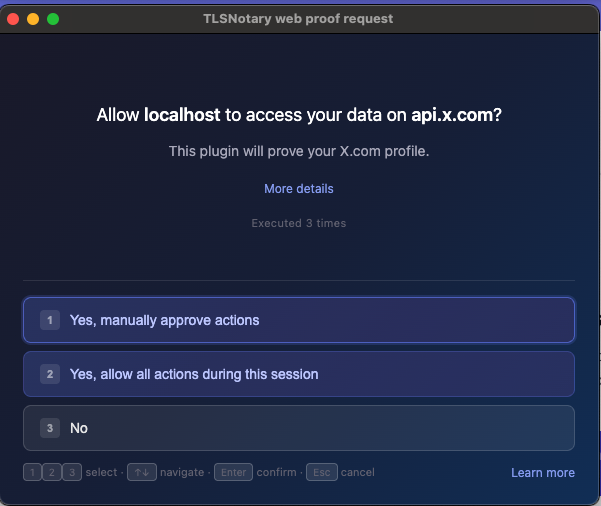
The approval screen that appears when a plugin starts does more than ask yes or no. It asks how much control you want over the plugin's prove() calls, with three choices:
Approve each request (manual, the recommended option) asks for approval before every individual prove() call. The user can decline any call they did not expect.
Allow all data sharing this session (all-session) approves the plugin once. All subsequent prove() calls in that session run without interruption.
No (rejected) stops the plugin from running at all.
In manual mode, the per-call approval screen shows the exact target URL and method, which handlers are active (what will be revealed vs. hashed), and the verifier URL where the proof will be sent.
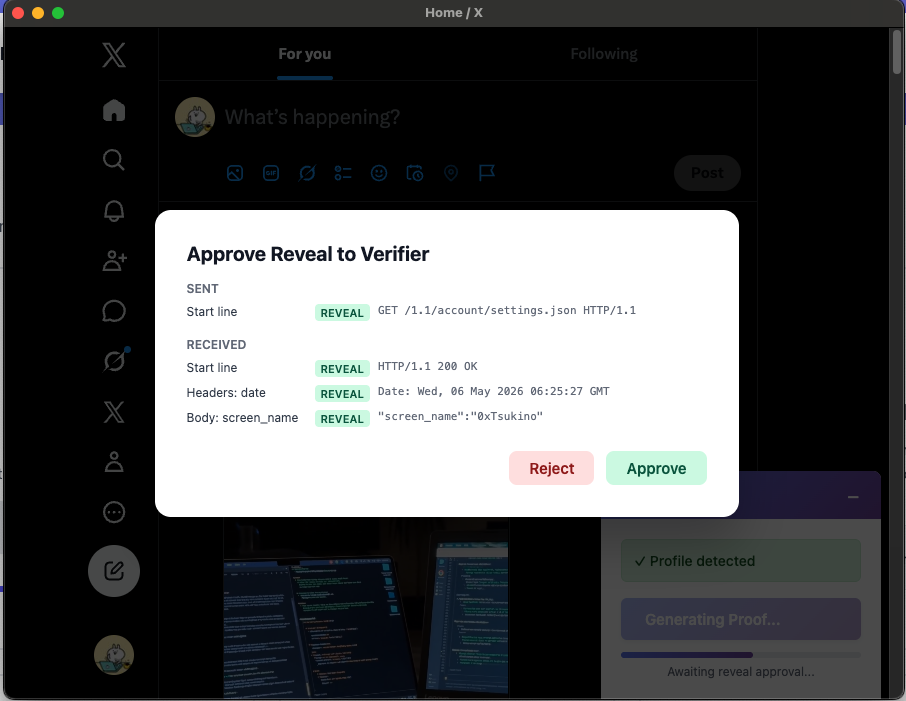
The reason manual mode matters: a plugin the user has approved might legitimately call prove() multiple times across a session. In all-session mode those run silently after the initial approval. In manual mode each one is surfaced individually, so the user retains veto power over the exact moment their authenticated data is committed to a proof and sent to a verifier.
Summary
The broad permissions exist because TLS proofs require seeing real authenticated HTTP traffic — that is the point of TLSNotary. Capturing that traffic from an arbitrary HTTPS host in a browser means webRequest + <all_urls> + extraHeaders. There is no narrower set of APIs that accomplishes the same thing.
What keeps those permissions from being abused is scoping plus five layers of constraint:
Scoping. Interception fires only for windows the extension explicitly manages. Normal browsing is never touched.
The five layers, narrowing what a plugin can do at each step:
- Sandbox — plugins run in WebAssembly with no network or filesystem access.
- Declaration — every plugin lists the exact requests it intends to make, in source.
- Runtime enforcement —
prove()calls are checked against that list and denied by default. - User approval — the plugin's name, permissions, and full source can be inspected before it runs. Manual approval mode tightens this further, surfacing every
prove()call for inspection before any data is revealed. - Selective disclosure — handlers give byte-level control over what ends up in the final proof.
The architecture is designed so that a malicious or compromised plugin cannot exceed its declared scope, and so that a user who wants full visibility into what is being proved can have it.
Try It Yourself
- See it in action: try the extension at demo.tlsnotary.org.
- Build your own plugin: follow the plugin tutorial — or point your favorite AI assistant at it and have it help you.
For the source or to audit the permission system: GitHub · Plugin SDK docs